Workday Fixed the Retyping. It Didn’t Fix the Job Search
Workday Candidate Profile, announced at Workday Rising on October 13, 2026, lets you save your details once and reuse them when applying to employers running on Workday. The system expects to pre-fill roughly 80% of standard fields and make applying up to 40% faster. That is welcome news. But it only works inside Workday’s walled garden.

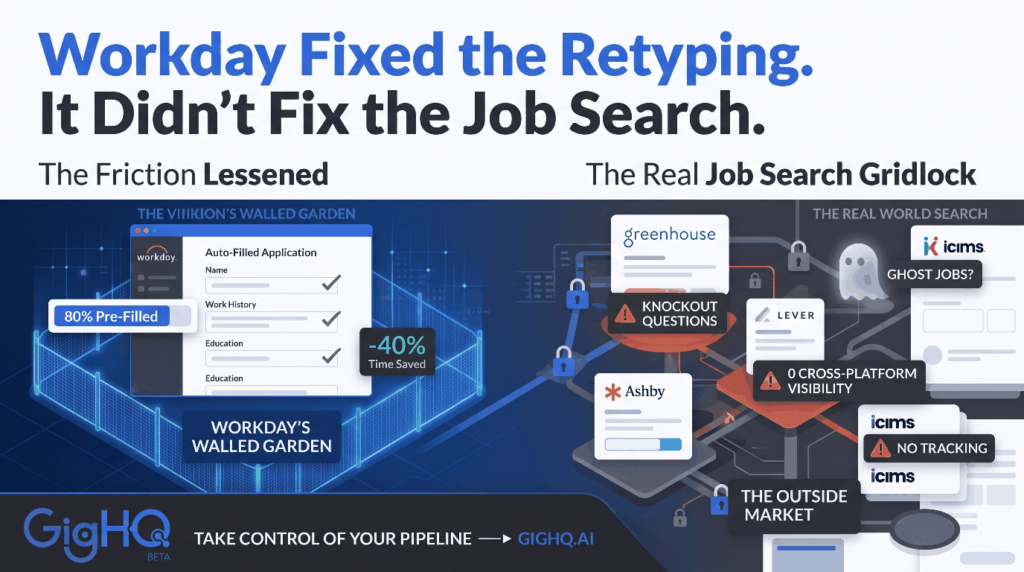
The short answer: Workday Candidate Profile, announced at Workday Rising on October 13, 2026, lets you save your details once and reuse them when applying to employers running on Workday. The system expects to pre-fill roughly 80% of standard fields and make applying up to 40% faster.
That is welcome news. But it only works inside Workday’s walled garden. It will not bypass custom knockout questions, it will not protect you from ghost jobs, and it will not help you coordinate the dozens of other applications scattered across Greenhouse, Lever, Ashby, and iCIMS.
What Did Workday Actually Announce?
At its annual Workday Rising conference, Workday announced the Workday Candidate Profile. The feature is designed as a portable, saved profile for applicants navigating employers on the Workday Recruiting ecosystem.
Here are the key mechanics:
- Passwordless Authentication: You log in across participating Workday career portals using an email address and a one-time passcode (OTP).
- Automated Profile Pre-fill: Standard fields—including contact details, work history, education credentials, and listed skills—are pre-populated, covering approximately 80% of standard form fields.
- 40% Velocity Boost: Workday projects that reducing manual entry will shorten submission time by about 40%.
- Candidate Review Gate: Applicants can review, edit, or adjust disclosures and answers on an employer-by-employer basis before submitting.
- Mobile-First Interface: Optimized for mobile browser workflows, specifically targeting hourly and frontline talent pools who complete applications on smartphones.
Workday emphasized that the feature does not evaluate, score, or reject applicants: “It doesn’t rank, recommend, or reject anyone.” It serves strictly as a profile persistence and form-completion utility.
Availability: The feature is slated for general availability to Workday Recruiting enterprise customers in early 2027.
Why This Matters (The Friction Is Real)
Anyone who has spent a Sunday afternoon uploading a clean PDF resume, only to manually retype every employer name, job title, and bullet point into repetitive text boxes, knows the frustration.
According to Workday’s announcement data:
- 60% of candidates abandon applications before completion due to process length, broken mobile interfaces, and form fatigue.
- The average job search currently spans 11 weeks, turning repetitive data entry into a significant drain on time and morale.
Workday’s President of Product and Technology, Gerrit Kazmaier, framed the problem directly: “Nobody should have to retype their resume every time they apply for a job.”
He is right. Eliminating redundant form fields is a step forward for candidate experience.
What Workday Candidate Profile Doesn’t Fix
While eliminating repetitive typing removes friction, form-filling is only a small slice of the modern hiring problem. A faster submission process does not solve structural market inefficiencies:
1. It Operates Inside a Single Walled Garden
Workday handles thousands of enterprise employers, but it is far from the entire market. Mid-market tech firms, startups, and high-growth organizations frequently use Greenhouse, Lever, Ashby, iCIMS, SmartRecruiters, or BambooHR. When you transition from a Workday company to a Greenhouse or Ashby company, your portable profile vanishes. You are back to square one.
2. Knockout Questions Remain Untouched
Workday confirmed that employer-specific application workflows, validations, and screening questions remain entirely intact. Pre-filling your graduation year will not bypass knockout questions regarding:
- Specific technical proficiencies
- Work authorization and visa sponsorship status
- Salary requirements
- Location, commute, or on-site attendance thresholds
A misjudged answer on an automated filter can lead to an instant rejection, regardless of how quickly the form was completed.
3. Faster Submission to Ghost Jobs Is Still Lost Time
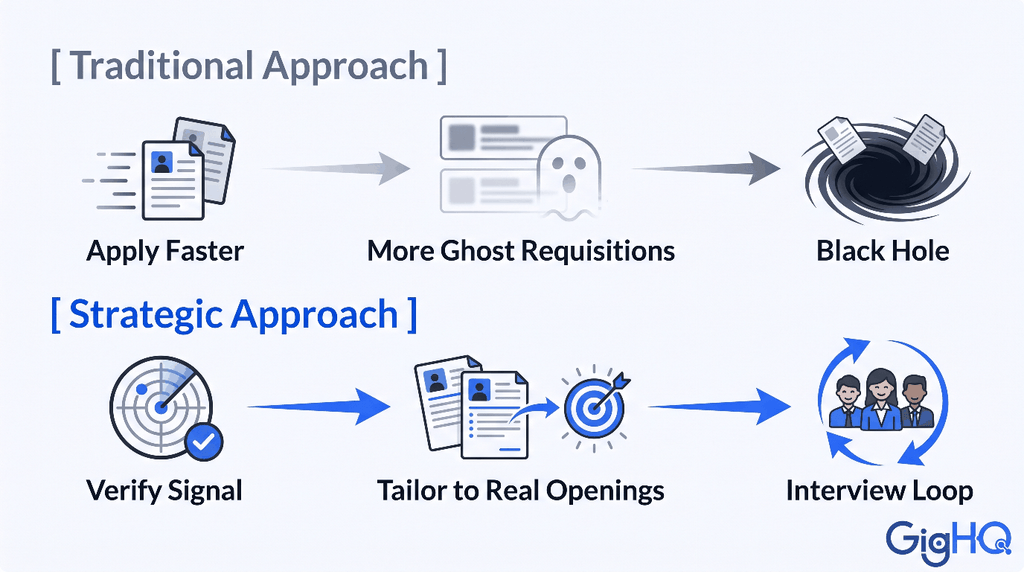
Data across major job boards indicates that a notable portion of active listings are effectively ghost jobs—postings left up to build passive talent pipelines, fulfill internal listing compliance, or maintain company visibility with no active requisition.
Submitting your credentials 40% faster to an unmonitored requisition still yields an unanswered application.
4. Zero Cross-Platform Visibility
Workday’s tool will not track whether you applied on Workday, LinkedIn, or directly through an external portal. It will not ping you when 14 days pass without an update, organize recruiter outreach, or coordinate your interview notes.
Applying Smarter: 4 Strategies for Today’s Market
With Workday’s feature slated for 2027, job seekers need practical tactics to manage high-friction application pipelines right now.
1. Evaluate Authenticity Before Applying
Before spending 20 minutes customizing a portfolio or cover letter, check whether the company is actively reviewing candidates. Look at posting dates, evaluate whether the role appears directly on the employer’s verified career page, and examine hiring signals to verify responsiveness.
2. Treat Knockout Questions with Precision
Because screening questionnaires drive immediate rejection logic, take your time on custom prompts. Never rush through salary expectations, relocation allowances, or technical disclosures. Provide clean, transparent answers and use open commentary fields to supply context where permitted.
3. Optimize Your Presentation for the Specific Role
Blasting generic resumes through faster forms does not produce interviews. Review the job description’s core competencies and verify that your real, verified achievements reflect the employer’s specific operational needs.
4. Maintain a Unified Command Center
When managing 30 to 50 active opportunities across multiple applicant tracking systems, tracking statuses in spreadsheets creates clutter and missed deadlines. Keep a single record of every submission, correspondence timestamp, interview stage, and follow-up window.
The GigHQ Approach: From Application Fatigue to Search Strategy
Workday is optimizing the employer’s intake form. GigHQ.ai is built to give the job seeker complete control across the entire hiring lifecycle.
Rather than looking at each job site in isolation, GigHQ provides a unified system for your job search:
1. Automated Tracking Without Spreadsheets
When you apply with your dedicated @gighq.ai address, confirmations, recruiter correspondence, and status updates sync automatically to your dashboard. No manual logging required.
Watch how automated tracking replaces messy spreadsheets: Watch the GigHQ Application Tracking Demo on YouTube
2. Real-Time Insights on Any Job Listing
Instead of wondering if an employer is responsive, the free GigHQ Chrome Extension works across Workday, Greenhouse, Lever, Ashby, LinkedIn, and 50+ platforms. It surfaces real-time hiring trends, posting timelines, and community authenticity indicators directly in your browser.
See the Chrome extension in action: Watch the GigHQ Browser Extension Workflow on YouTube
3. Objective Role Matching and Preparation
Rather than guessing why a resume fails an initial screen, use tools like ResumeRank to measure your profile against the specific requirements of any job description. Identify keyword gaps, align terminology, and draft contextual cover letters in seconds. When you land the interview, run structured practice through SmartPrep to rehearse role-specific behavioral scenarios.
See how to evaluate skills gaps and optimize role readiness: Watch the GigHQ Resume Scoring and Role Alignment Demo
4. Connect Your Search Directly to Your AI Assistant
If you already use conversational AI to refine your career strategy, connect GigHQ directly to your workflow using our MCP Server. Query application timelines, log updates, check company visa policies, and audit your search progress inside ChatGPT or Claude.
Explore conversational job search management: Watch the GigHQ MCP Server Integration Walkthrough
Workday Profile vs. GigHQ.ai: At a Glance
| Feature / Capability | Workday Candidate Profile | GigHQ.ai Personal Copilot |
| Primary Beneficiary | Employers (Reduced drop-off) | Job Seekers (Clarity & agency) |
| Cross-Platform Reach | Workday Recruiting only | Workday, Greenhouse, Lever, Ashby, LinkedIn, 50+ ATS platforms |
| Form Auto-Fill | Yes (~80% on Workday forms) | Yes (Universal auto-fill via Chrome extension) |
| Application Tracking | Limited to Workday instances | Automated, centralized dashboard for all applications |
| Ghost Job & Activity Signals | None | Real-time community data & freshness indicators via Job Market Radar |
| Role Fit & Resume Insights | None (“Does not rank or recommend”) | Instant match scoring, keyword audit & tailored resume drafting |
| AI Copilot Integrations | Proprietary internal workflows | Native integration with Claude Desktop, ChatGPT & custom MCP clients |
The Verdict
Workday Candidate Profile solves a real user frustration: repetitive typing. Any technology that saves candidates from entering work history into duplicate form boxes is a positive development.
However, form filling is only a fraction of the challenge. Making a form faster does not tell you if an opening is active, how your skills align with the hiring team’s priorities, or how to manage communications across multiple hiring tools.
A faster form is convenient. A coordinated, data-backed job search strategy is what gets you hired.
Ready to take control of your pipeline across every company and platform? Get started with GigHQ.ai for free and stop applying into the dark.
Frequently Asked Questions (FAQ)
What is the Workday Candidate Profile?
The Workday Candidate Profile is a feature announced by Workday on October 13, 2026. It allows job seekers applying through Workday-hosted career sites to save their resume details, contact information, and job history once, pre-populating roughly 80% of standard application fields across participating employers.
When will Workday Candidate Profile launch?
Workday announced that the capability is expected to be generally available to Workday Recruiting enterprise customers in early 2027.
Does Workday Candidate Profile rank or score candidates?
No. Workday clearly states that the feature does not rank, recommend, or filter applicants. It is strictly an applicant profile management and form-filling tool.
Will my Workday profile work on Greenhouse, Lever, or Ashby?
No. Workday Candidate Profile is exclusive to companies using Workday Recruiting. To track and manage applications uniformly across all applicant tracking systems, you can use a cross-platform companion like GigHQ.ai.
Does the profile automatically answer employer screening questions?
No. Custom employer questionnaires, location parameters, salary questions, and knockout questions remain intact and require direct candidate responses for each submission.