
Your Job Search,
Inside Your AI Assistant
Connect Claude, ChatGPT, or Grok directly to your live GigHQ data. Track applications, analyze skills gaps, research hiring metrics, and maintain your career journal — without switching tabs.
https://mcp.gighq.ai/mcp
Contextual AI Search in Real-Time
Watch how GigHQ MCP Server turns natural language prompts into live pipeline updates and deep company intelligence.
What is the Model Context Protocol?
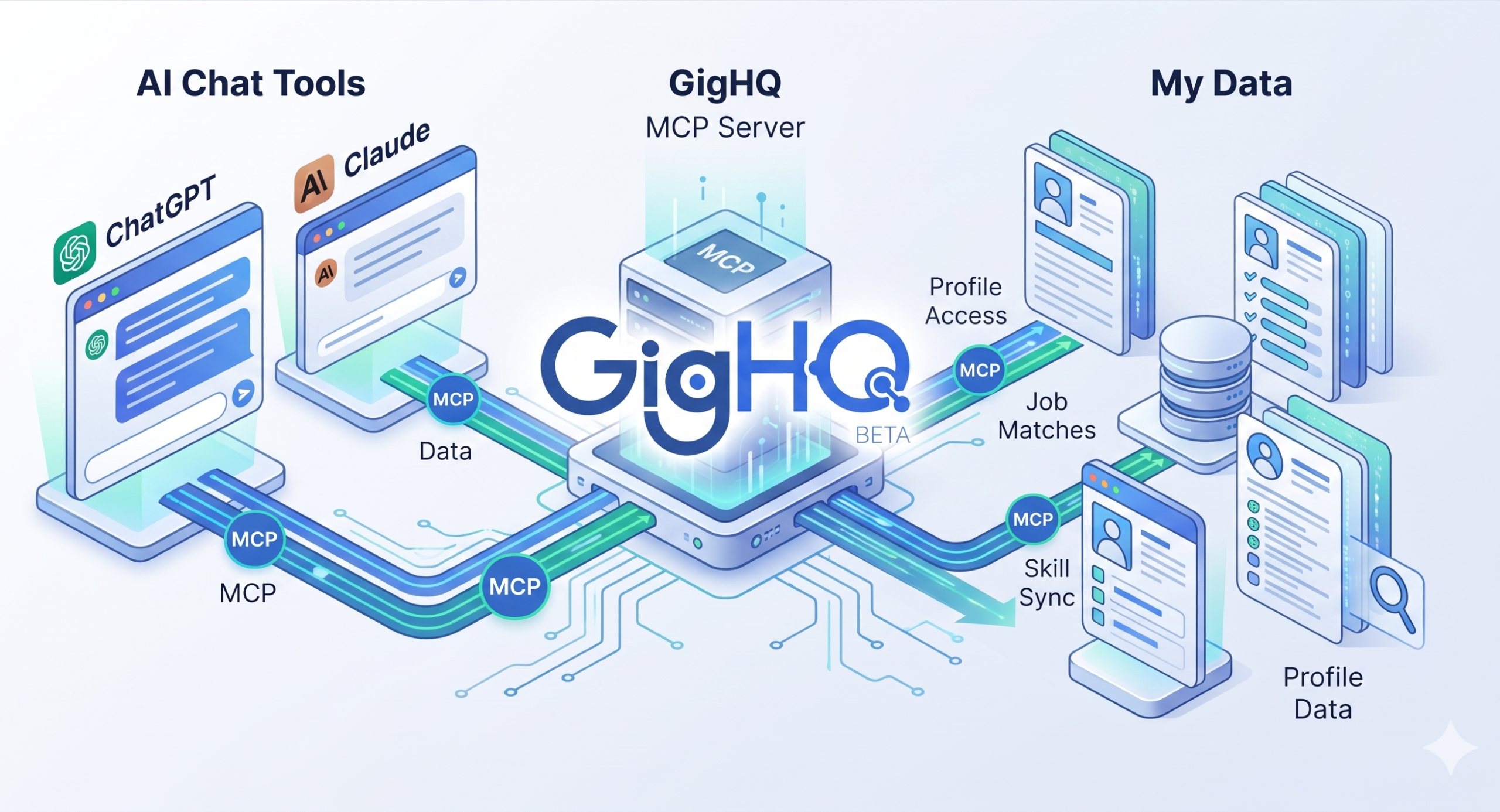
The Model Context Protocol (MCP) is an open standard that lets AI assistants like Claude and ChatGPT securely connect to external tools and data.
The GigHQ MCP Server makes your personal GigHQ account available as a live, secure data source inside your AI conversations. No copy-pasting required.
Zero Credential Sharing
OAuth 2.0 authentication protects your account. Your password is never shared with your AI assistant.
Live Data Sync
Changes made during your chat sessions update your GigHQ pipeline immediately in real-time.
Structured Intelligence
Extract interview insights, skills gaps, and visa sponsorship history through natural conversation.
Powerful AI Workflows
Try these ready-to-use prompts with your AI assistant once the GigHQ MCP Server is connected.
Job Application Tracking
Ask your AI to show recent applications, find specific companies, flag stale follow-ups, or log a new application without leaving your chat.
"Show me everything I have in progress and flag anything I haven't touched in two weeks."
Skills Gap Analysis
Save a job description in GigHQ, then ask your AI to run a structured skills gap analysis to surface match strengths and cover letter talking points.
"Do a skills gap analysis for the Stripe role I saved last week."
Company & Visa Intelligence
Look up hiring trends, applicant volume, time-to-decision metrics, and historical H1B sponsorship records for any employer.
"Does Airbnb sponsor H1B visas? And how long does their interview process typically take?"
Weekly Job Search Summary
Get a plain-language health check on your pipeline: stage conversion rates, longest-open roles, and suggested focus areas for the week ahead.
"Give me a summary of my job search this week."
Career Journal & Milestones
Log achievements, project milestones, and tech wins as they happen so raw material is ready whenever you write a resume or cover letter.
"Add an entry to my career journal: I led the migration to the new billing system, cut support tickets by 30%."
Guided Reflection Prompts
Request guided prompts from your AI assistant to help you reflect on your work and surface achievements you might have overlooked.
"Give me 3 guided journal prompts to reflect on my wins at work this week."
Integrate With Your AI Assistant
Select your preferred AI client below for step-by-step connection instructions.
Connecting to Claude (claude.ai & Claude Desktop)
-
1
Open Claude Settings
In claude.ai or Claude Desktop, navigate to Settings → Integrations / Developer.
-
2
Add Custom MCP Server
Click Add MCP Server and enter the server endpoint URL:
https://mcp.gighq.ai/mcp -
3
Authorize via OAuth 2.0
You will be redirected to GigHQ to sign in and authorize access. Your credentials are never shared with Anthropic.
-
4
Start Prompting
Ask Claude: "Show my recent applications from GigHQ" to start using live data.
{
  "mcpServers": {
    "gighq": {
      "url": "https://mcp.gighq.ai/mcp",
      "transport": "http"
    }
  }
}
Connecting to ChatGPT (chatgpt.com & ChatGPT Desktop)
-
1
Open ChatGPT Settings
Open ChatGPT Settings → Apps & Integrations → Custom Connectors.
-
2
Add Connector URL
Click Add Connector and paste the endpoint:
https://mcp.gighq.ai/mcp -
3
Authenticate Account
Click Connect Account to authorize your GigHQ account securely.
-
4
Ready to Prompt
In any ChatGPT conversation, ask: "Give me a summary of my job search this week."
https://mcp.gighq.ai/mcpConnecting to Grok (grok.com & Grok Desktop)
-
1
Click "Skills and Connectors"
In the left sidebar of Grok, click on Skills and Connectors.
-
2
Switch to Connectors & Add New
Switch to the Connectors tab at the top and click the New Connector button.
-
3
Enter Server Endpoint URL
Name the connector
GigHQ.aiand paste the MCP server endpoint:https://mcp.gighq.ai/mcp -
4
Connect & Start Prompting
Click Connect to authorize. Once shown as Connected, ask in any chat: "Review my open job applications and summarize recent updates."
https://mcp.gighq.ai/mcpExplore All 16 MCP Tools
Filter tools by functional area.
get_recent_applications
OAuth Required
List your 10 most recent job applications with status, dates, and stage metadata.
search_job_applications
OAuth Required
Find job applications matching a specific company name or keyword query.
get_job_application
OAuth Required
Fetch full details, notes, salary info, and stage history for a single application ID.
create_job_application
OAuth Required
Log a new job application directly into your GigHQ tracker from chat.
update_job_application_status
OAuth Required
Update an application's current stage (e.g. Applied, Interviewing, Offer, Rejected).
check_stale_applications
OAuth Required
Find job applications with no recent activity or updates in over 14 days.
weekly_job_search_summary
OAuth Required
Generate an executive weekly pipeline health digest and conversion rates.
analyze_skills_gap
OAuth Required
Structured skills gap analysis comparing a saved application to your background profile.
search_companies
Public Tool
Search companies in GigHQ's database by company name or sector.
get_company_details
Public Tool
Fetch company hiring metrics, applicant volume, and average time-to-decision by stage.
get_job_details
Public Tool
Retrieve job-level applicant metrics, timeline benchmarks, and requirements.
lookup_h1b_sponsorship
Public Tool
Check if a company historically sponsors H1B visas based on official labor data.
add_career_entry
OAuth Required
Add an achievement, project win, or technical milestone to your career journal.
update_career_entry
OAuth Required
Edit an existing career journal entry or update accomplishment metrics.
list_career_entries
OAuth Required
View your saved career journal entries to reference during interviews or resume writing.
get_career_journal_prompts
OAuth Required
Get guided prompts to help you reflect on your work and extract achievements.
Enterprise Security via OAuth 2.0
Authentication uses OAuth 2.0 — the same industry standard used by Sign in with Google and Sign in with Apple. Your GigHQ credentials are never shared with your AI assistant.
No Passwords Shared
You authorize access directly on GigHQ.ai. Your AI assistant only receives a secure token.
Private Account Scope
Queries are strictly scoped to your authenticated account. GigHQ never sends data proactively.
One-Click Revocation
You can disconnect active AI assistant sessions at any time in your GigHQ Account Settings.
Frequently Asked Questions
Everything you need to know about setting up and using the GigHQ MCP Server.
Use this URL when configuring the GigHQ server in any MCP-compatible AI assistant: https://mcp.gighq.ai/mcp
Yes. The MCP server connects to your personal GigHQ data, so you need an account to use the authenticated tools. Company search and H1B lookup are available without authentication.
When you ask your AI a question, the relevant data from GigHQ is included in that conversation. Your data is handled according to your AI assistant's privacy policy. GigHQ never sends your data proactively.
Currently Claude (via claude.ai and Claude desktop app), ChatGPT (via chatgpt.com and the ChatGPT desktop app), and Grok (via grok.com and Grok desktop app). Any MCP-compatible client that supports Streamable HTTP transport will work.
The MCP server is available to all GigHQ users at no additional cost.