
AI Job Search Tools: You Don’t Need to Run a Repo to Use Them
Some of the best AI job search tools out there are open-source repositories you clone, install, and run locally. If you would rather skip the local environment setup and start tracking opportunities immediately, GigHQ provides a clean, free web app designed to organize your pipeline.

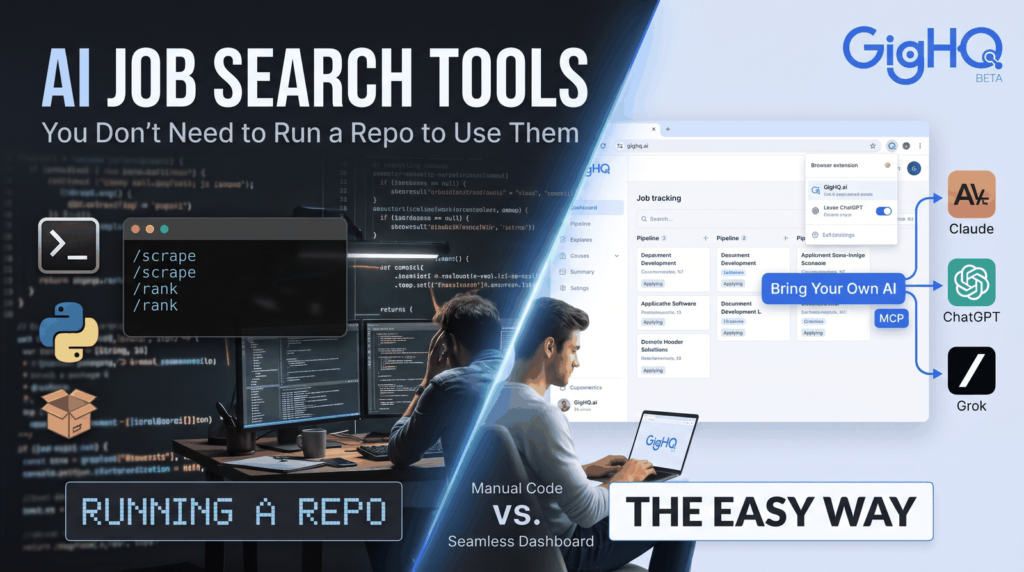
Quick answer: Some of the best AI job search tools out there are open-source repositories you clone, install, and run locally. They are undeniably powerful, but they typically demand a paid AI subscription, comfort with the terminal, and a stack of developer tools. If you would rather skip the local environment setup and start tracking opportunities immediately, GigHQ provides a clean, free web app designed to organize your pipeline—with the flexibility to bring your own AI model via Claude, ChatGPT, or Grok through an open Model Context Protocol (MCP) server.
People Are Building Great AI Job-Search Tools
Search for modern ai tools for job seekers today and you will notice an interesting shift. Alongside legacy job boards, individual software engineers and builders—frequently navigating career pivots or post-layoff searches themselves—are writing custom scripts, command-line interfaces (CLIs), and autonomous agents to automate their job hunts. Many of these builders generously open-source their codebases for anyone to inspect and fork.
We think that is outstanding. It highlights the immense value of using artificial intelligence to handle the most exhausting stages of hunting for work:
- Parsing dense, repetitive job descriptions
- Tailoring resumes and cover letters to target keywords
- Tracking active submissions across dozens of platforms
- Structuring behavioral answers for upcoming interview screens
When job seekers build software to solve their own search fatigue, everyone benefits from the proof of concept.
A Closer Look: Mads Lorentzen’s ai-job-search
A prime example is the popular repository ai-job-search by Mads Lorentzen. Positioned as “the job search that runs on your machine,” it is an end-to-end framework built on Claude Code designed to ingest postings, rank company fit, tailor CVs, draft cover letters, and prepare for candidate interviews. Mads created the toolkit after experiencing a layoff, open-sourcing the system so others in tech could adapt it.
The workflow is architected around discrete terminal commands that match the stages of a standard search pipeline:
/setup: Configure your professional background and candidate profile/scrape: Extract raw job postings from online boards/rank: Score postings against your experience and target competencies/apply: Draft job-specific application materials and resumes/interview: Generate targeted mock interview prep questions/outcome: Record responses, offers, or rejections/gmail-sync: Pull inbound updates directly from your inbox
Mads reported compelling real-world metrics from running his own pipeline: 69 tailored applications, 20 first interviews, and a signed employment contract. That is a builder solving an urgent, personal challenge and handing the code to the broader community. Credit where it is due.
What It Takes to Run a DIY Tool
Here is the practical reality: tools designed by developers naturally assume that you are comfortable operating like one.
Running an open-source, local agent stack like ai-job-search typically requires:
- A Paid AI API or Tool Subscription: Running local agent loops or Claude Code demands active API credits or a paid subscription tier.
- Terminal Fluency: You must be comfortable managing environments, running CLI commands, handling shell errors, and resolving dependencies.
- Local Toolchains: You will need to install and configure runtimes like Python 3.10+, modern package managers like Bun, and document typesetting engines like LaTeX (often necessary for building automated PDF resumes).
- Ongoing Maintenance: You are responsible for handling broken web scrapers when job boards update their markup, fixing schema errors, and managing API token limits.
Additionally, many open-source projects are localized to the creator’s home market. For instance, scrapers configured for European or Danish portals must be refactored if you are searching on Greenhouse, Lever, Workday, or US job platforms.
None of this is a flaw in DIY projects—it is simply what running software locally entails.
Who DIY Is a Great Fit For (And Who It Isn’t)
| A DIY Repo Is a Great Fit If You… | It Is Probably a Poor Fit If You… |
| Are an engineer or technical tinkerer | Have never opened a terminal or command prompt |
| Want complete, air-gapped control of your raw files | Are overwhelmed by the emotional stress of a layoff |
| Enjoy debugging build steps and custom LaTeX styles | Just want a working system up and running in 60 seconds |
| Have ample spare time between interviews to patch code | Prefer managing applications on mobile while away from your desk |
For the majority of candidates, learning Bun, Python virtual environments, and LaTeX packages while managing an active search creates unnecessary friction. Modern job seeking is already demanding; running your own software stack should not be a prerequisite for finding a role.
How GigHQ Does Similar Work Without the Setup
GigHQ was built on a simple premise: keep the engineering complexity behind the scenes while providing candidates with a fast, zero-maintenance command center.
Instead of configuring CLI flags and database connections, you get an integrated ecosystem out of the box:
- Free for Job Seekers: No mandatory AI subscriptions or platform fees to access core tracking features.
- Progressive Web App (PWA): Access your search on desktop, tablet, or phone without maintaining a local workstation.
- Browser Extension Support: Stop copy-pasting job descriptions. The GigHQ Chrome Extension detects listings on LinkedIn, Indeed, Handshake, and 50+ applicant tracking systems (Greenhouse, Lever, Workday, Ashby, and more) with a single click.
- Automated Inbox Sync: Apply using your assigned
@gighq.aiemail address to have confirmations, recruiter interview requests, and updates tracked automatically on your dashboard—no manual spreadsheet logging. - Career Journal: Build a living inventory of quantified achievements, projects, and impact metrics as they occur. When you need to draft resumes or interview answers, your raw materials are already organized.
- Job Market Radar & Community Signals: Identify responsive companies and avoid inactive postings before you spend 30 minutes tailoring materials.
If you are currently evaluating options, check out our roundup of the top application trackers to see how automated tracking compares to static spreadsheets.
Bring Your Own AI: The GigHQ MCP Server
If you appreciate the autonomy of a DIY tool but prefer not to manage scrapers and local databases, GigHQ offers the best of both worlds through our Model Context Protocol (MCP) server.
MCP is an open standard that allows conversational AI models—such as Claude, ChatGPT, or Grok—to securely interact with external tools and personal datasets. Instead of manually pasting your resume and past applications into chat prompts, you can connect your AI assistant directly to your GigHQ workspace.
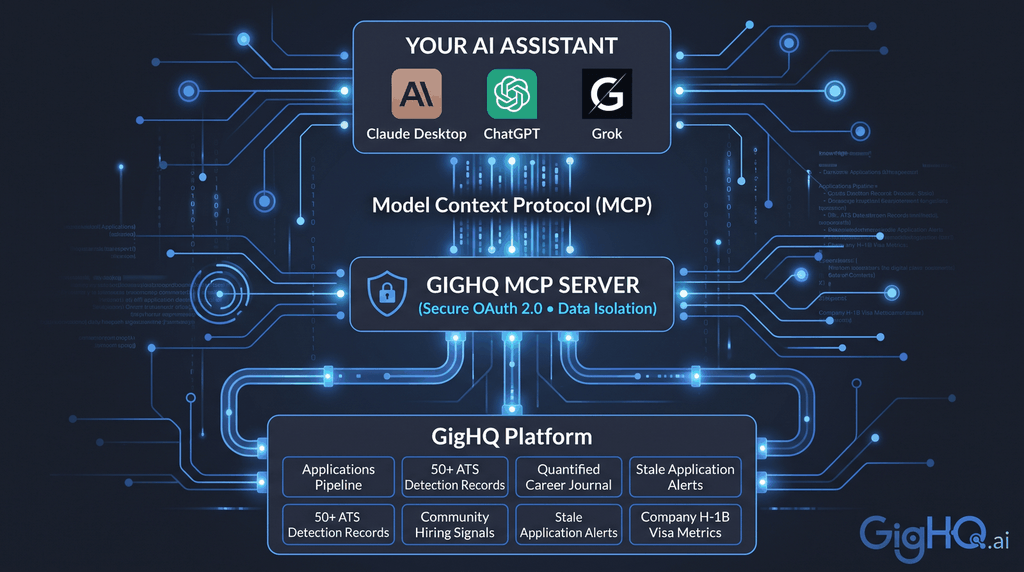
Once connected, you can manage your search through plain conversation:
- “Show me all applications currently in ‘Interviewing’ and flag any that haven’t responded in over 10 days.”
- “Run a skills gap analysis between my saved profile and the Product Manager role at Acme Corp.”
- “Give me a weekly summary of my search pipeline, including conversion rates and where I should focus next.”
- “Add an entry to my Career Journal documenting the infrastructure migration project I completed this week.”
- “Does this company sponsor H-1B visas based on GigHQ community records?”
You authenticate securely using OAuth 2.0, meaning your platform password is never exposed to the LLM client. You get the intelligence of a personal AI job agent without having to maintain a single repository.
To see our AI workflows in action, explore these walk-throughs:
- Watch how GigHQ automates application management
- See the interactive candidate matching and smart prep demo
- Explore our tools for tracking and market intelligence
What GigHQ Doesn’t Do (Yet)
In the spirit of complete transparency, here is what GigHQ does not support today:
- No Native App Store Downloads: We operate as a responsive Progressive Web App (PWA) installable through your mobile browser, rather than standalone iOS or Android builds.
- No Safari Extension: Our extension currently supports Chromium-based browsers (Chrome, Edge, Brave) and Firefox.
- No Direct CSV Export: While your data is accessible via the dashboard, MCP server, and profile views, raw one-click CSV file exports are still on our engineering roadmap.
Frequently Asked Questions
Are open-source AI job search tools worth trying?
Yes. If you have a technical background, understand terminal workflows, and already hold paid developer API access, open-source repositories provide complete customization and inspectable code. Just make sure to budget setup and debugging time.
Do I need to know how to code to use GigHQ?
No. GigHQ is an entirely no-code, web-based platform. You can register, install the browser extension, and begin tracking roles in under two minutes without touching a terminal.
Can I connect GigHQ to ChatGPT, Claude, or Grok?
Yes. With the GigHQ MCP server, you can link your GigHQ account directly to MCP-compliant desktop tools and chat interfaces. This lets your favorite AI assistant query your active pipeline, analyze skills gaps, and update your application notes via natural language.
Is GigHQ free for job seekers?
Yes. Core job-search organization, the browser extension, application tracking, and our MCP server connection are free for individual candidates.
Get Started
Open-source builders have demonstrated what is possible when modern AI is applied to career hunting. But taking advantage of AI should not require managing dependencies, installing compilers, or running scripts locally.
If you want to spend your time interviewing rather than maintaining local code:
- Create your free account on GigHQ
- Add the Chrome Extension to save roles directly from LinkedIn, Indeed, and company career pages
- Connect your workspace to Claude, ChatGPT, or Grok via MCP for interactive assistance
Let the technology handle the busywork so you can focus on landing your next role.