You’ve spent hours perfecting your bullet points. You’ve quantified your achievements. You’ve matched the keywords. But the rejection email still hits your inbox within minutes.
In the high-stakes world of corporate hiring—especially in Tech, Finance, and Marketing—your resume is more than a list of jobs. It is your first deliverable. It is a testament to your professional judgment, attention to detail, and technical literacy.
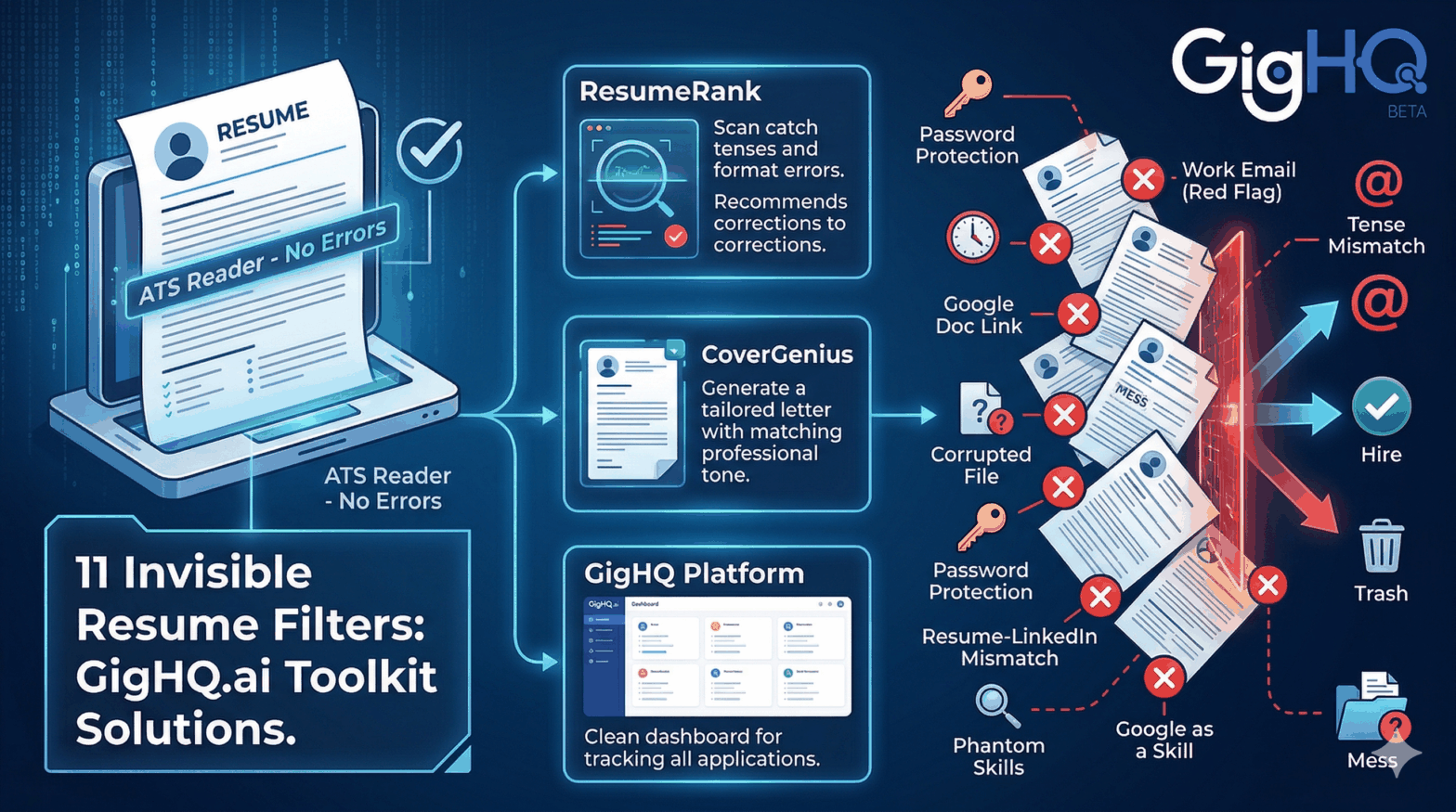
Often, it’s not your lack of experience that gets you filtered out; it’s the “invisible” mistakes that signal a lack of professionalism. Based on insights from seasoned resume writers and recruiters, here are the 11 mistakes that cause instant disqualification and how to fix them using the GigHQ.ai Platform toolkit.
1. Using Your Current Work Email
Applying from [email protected] is a massive red flag. It tells a recruiter two things: you’re searching for a job on your current company’s time, and you have poor boundary judgment.
- The Fix: Use a dedicated email – using your
[email protected]is even better. It signals to recruiters that you are running a thoughtful, intentful, and highly organized job search—treating your career move with the same level of branding and precision as a high-value project.
2. Misaligned Tenses
If your current role is described in the past tense (e.g., “managed teams” instead of “manage teams”), recruiters assume you’ve already checked out or have been let go.
- The Fix: Current jobs should always be present tense. Previous roles should always be past tense. Our ResumeRank tool automatically flags these grammatical inconsistencies.
3. The “Request Access” Trap
Never send a Google Docs share link. If permissions aren’t set correctly, the recruiter sees a “Request Access” screen. They won’t wait; they’ll move to the next candidate.
- The Fix: Always download your resume and send it as a static PDF or Word document.
4. File Corruption & Password Protection
Recruiters handle hundreds of files a day. If your PDF is corrupted or requires a specific version of Adobe Pro to open, it’s going in the trash.
- The Fix: Test your file on multiple devices before uploading. If you use ResumeRank, we ensure your exported file is optimized for standard ATS readers.
5. Messy Filenames
Resume_FINAL_v3_UPDATED.pdf screams “disorganized.” Your filename is the first thing a recruiter sees in their downloads folder.
- The Fix: Use a standard format:
FirstName_LastName_Resume.pdf.
6. The Resume vs. LinkedIn Mismatch
If your resume says “Senior Manager” but your LinkedIn says “Coordinator,” recruiters will assume you are lying. In the age of digital footprints, consistency is non-negotiable.
- The Fix: Keep your titles and dates identical across all platforms.
7. Hiding Gaps with Year-Only Dates
Listing “2022–2024” to hide a 13-month gap is an old trick that no longer works. Recruiters know exactly what you’re doing, and it makes you look like you have something to hide.
- The Fix: Be transparent. Add a one-line explanation for a gap (e.g., professional development, family care, or travel) to show you are proactive.
8. Listing “Phantom” Skills
Don’t list “Expert in Python” if you’ve never used it in a professional capacity. If you can’t talk about it in detail during an interview, it shouldn’t be on the page.
- The Fix: Only list skills you can defend. Use our SmartPrep tool to practice discussing the skills you do have.
9. Overly Casual Language
“Crushed sales targets” might sound cool to your friends, but “Exceeded sales targets by 35% via strategic territory expansion” sounds like a professional.
- The Fix: Use industry-standard action verbs. Avoid slang.
10. Listing “Google” as a Skill
In 2026, being “proficient in Google” is like saying you are “proficient in breathing.” It’s a baseline expectation, and listing it looks like you’re desperate to fill space.
- The Fix: List specific technical tools like Google Analytics, SQL, or Salesforce.
11. Bad Page Breaks
If a job title is at the bottom of page one and the description starts on page two, it breaks the reader’s flow. Recruiters skim quickly; don’t make them work to find your experience.
- The Fix: Format with intention. Keep job blocks together.
Stop Guessing. Start Ranking.
The job market is tough enough without getting disqualified for a corrupted file or a bad tense. At GigHQ.ai, we built tools to ensure your first impression is flawless.
Before you hit “Apply” on that dream job:
- Run your resume through ResumeRank to catch tenses, formatting errors, and skill gaps.
- Generate a tailored cover letter with CoverGenius to match your professional tone.
- Track every application using GigHQ.ai so you never lose a lead.
Don’t let an “invisible filter” stop your career. Optimize your search today at GigHQ.ai.
Our Platform Tools:

ResumeRank
Scan your resume, get a score, fix what matters.

CoverGenius
Generate personalized, AI-powered cover letters in seconds.

OutreachAgent
Craft perfect networking and AI-powered follow-up emails with ease.

CareerCompass
Instantly generate a personal marketing plan from your resume to define your brand and attract the right opportunities.

Smart Prep
Simulates a real interview based on your resume and the job description, giving you real-time feedback to build your confidence.

Profile Spark
Optimize your LinkedIn profile to attract recruiters and opportunities.