You’ve been there. You started a chat thread with Claude or ChatGPT a month ago, titled it “Job Search 2026,” and you’ve been feeding it everything: your master resume, five different cover letters, and details about target companies ranging from a small startup to a massive enterprise.
At first, the AI was brilliant. It remembered that you needed a remote role and that you were pivoting from marketing to product management. But lately? It’s getting… confused. It’s writing generic cover letters that sound like everyone else’s. It suggested a role in an industry you explicitly ruled out weeks ago. It even forgot your target salary.
You assume the AI has a perfect memory of the entire conversation. But the technical reality is very different. If you are running a single, months-long chat thread for your job search, you are setting yourself up for failure due to a technical limitation known as “Context Rot.”
Here is why your long AI chats are failing, and how you need to change your workflow to get the precision you actually need.
The “Interface Illusion” vs. Technical Reality
When you scroll up in ChatGPT or Claude, you see a continuous, unbroken transcript of your entire job search history. This creates the “Interface Illusion”—the belief that the AI is reading that exact same transcript every time you ask it a question.
It isn’t.
Unlike human memory, a Large Language Model (LLM) doesn’t “remember” past conversations. For every single new message you send, the chat application has to re-package your entire conversation history and send it back to the model.
The physical limit of how much text the model can process at once is called the “context window.” While these windows are getting larger, pasting in multi-page resumes, lengthy job descriptions, and back-and-forth interview prep burns through this space incredibly fast.
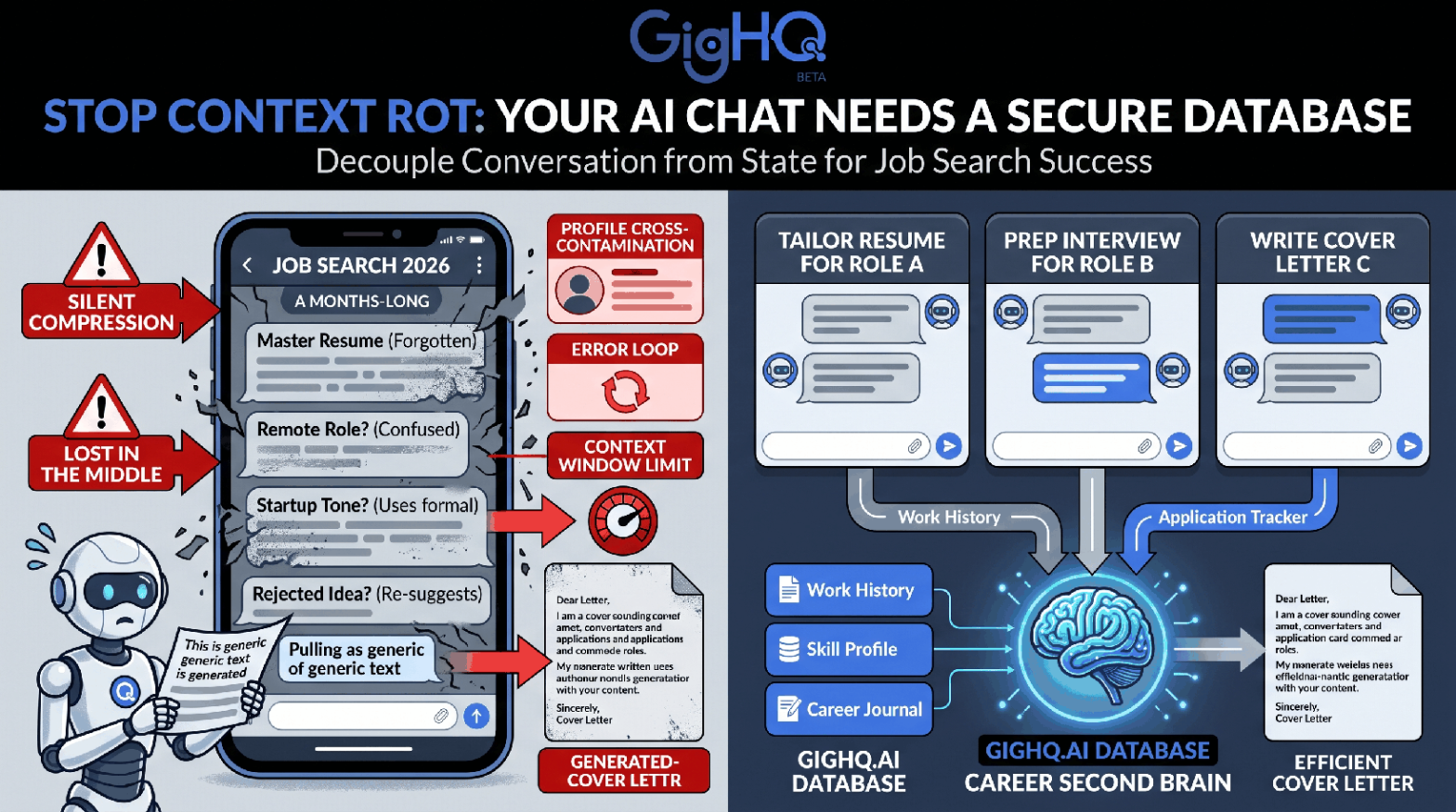
When your conversation exceeds this limit, the interface doesn’t usually warn you. Instead, it silently compresses the data. It might drop the oldest messages or attempt to summarize them. Essential constraints—like your visa requirements or salary minimum—are quietly discarded to make room for your latest prompt.
Furthermore, because the AI has to re-read the entire history on every turn, the cost of processing your chat grows exponentially. This “hidden token tax” is why power users on paid plans suddenly hit their usage limits and get locked out in the middle of a critical drafting session.
Two Core Phenomena: Lost in the Middle and Context Rot
Even if your chat physically fits within the context window, the AI’s ability to actually use that information degrades over time due to two documented phenomena.
1. The “Lost in the Middle” Effect
Research from Stanford University has proven that LLMs have a U-shaped recall curve. They pay excellent attention to the very beginning of a prompt (your initial instructions) and the very end (your most recent message).
But the information buried in the middle? The AI routinely ignores it.
In a long job search thread, the “middle” is exactly where your crucial working details live. It’s where you discussed the specific technical requirements for Company A, or where you refined your narrative about a past project. Because the AI mathematically overlooks this middle section, it starts generating generic advice or formatting things incorrectly.
2. Context Rot and the Error Loop
In complex workflows, performance drifts as the chat gets longer. This is “Context Rot.”
Worse, it operates on a self-reinforcing error loop. Let’s say the AI makes a subtle mistake on turn 40—perhaps it confuses a project you did at your last job with a requirement from a new job posting. That mistake is now permanently written into the chat log. On turn 41, the AI reads its own mistake and treats it as a validated fact.
Over weeks, these minor hallucinations, outdated assumptions, and rejected ideas compound. Your finely tuned cover letters slowly regress to the mean, sounding generic, confused, and mediocre.
Operational Failures in the Job Hunt
What does Context Rot look like in practice? It manifests as friction and frustration in your job search:
- Profile Cross-Contamination: You ask the AI to write a cover letter for a fast-paced startup, but it uses the formal, bureaucratic tone you established last week for a corporate role.
- Resurfacing Rejected Ideas: The AI suggests you highlight a specific project on your resume, completely forgetting that you explicitly told it not to use that project three days ago.
- Constraint Slippage: You receive a list of target companies, and half of them require relocation, despite your early instruction that you are strictly looking for remote work.
The Solution: Decoupling Conversation from State
The root of the problem is that you are using a chat thread as a filing cabinet. A linear chat is a terrible database.
To fix this, you must decouple the conversation (the AI drafting and brainstorming) from the state (your resume data, application history, and constraints).
You need to adopt a “one-task, one-thread” philosophy. You should start a fresh, clean chat session for every specific task—like tailoring a resume for one specific role, or prepping for one specific interview.
But how do you do that without having to manually copy-paste your master resume into every new thread?
This is where the GigHQ platform comes in. GigHQ acts as your persistent, secure database—your “Career Second Brain.” It stores your work history, your career journal entries, and your live application tracking data.
Through standard integration protocols (like the Model Context Protocol, which we’ll discuss in our next post), you can connect your AI assistant directly to your GigHQ database. The AI can pull exactly the data it needs for the specific task at hand, perfectly preserved and up-to-date, without dragging weeks of useless chat history along with it.
Stop relying on the AI to remember your career. Let GigHQ store the facts, and let the AI do what it does best: reason, write, and strategize in the present moment.
Our Platform Tools:

ResumeRank
Scan your resume, get a score, fix what matters.

CoverGenius
Generate personalized, AI-powered cover letters in seconds.

OutreachAgent
Craft perfect networking and AI-powered follow-up emails with ease.

CareerCompass
Instantly generate a personal marketing plan from your resume to define your brand and attract the right opportunities.

Smart Prep
Simulates a real interview based on your resume and the job description, giving you real-time feedback to build your confidence.

Profile Spark
Optimize your LinkedIn profile to attract recruiters and opportunities.