What the data shows and when double-column layouts backfire
There’s a debate that has been running in resume writing circles for years, and if you’ve spent any time searching for the “best resume format,” you’ve probably seen both sides argued with equal confidence.
Some experts swear by Word documents. “PDFs are encrypted,” they say. “Some ATS platforms can’t parse them. Stick with .docx and you’ll be safe.” Other experts argue the exact opposite: “PDFs preserve your formatting, they render consistently across devices, and they look far more polished when a human finally opens them.”
So which is it?
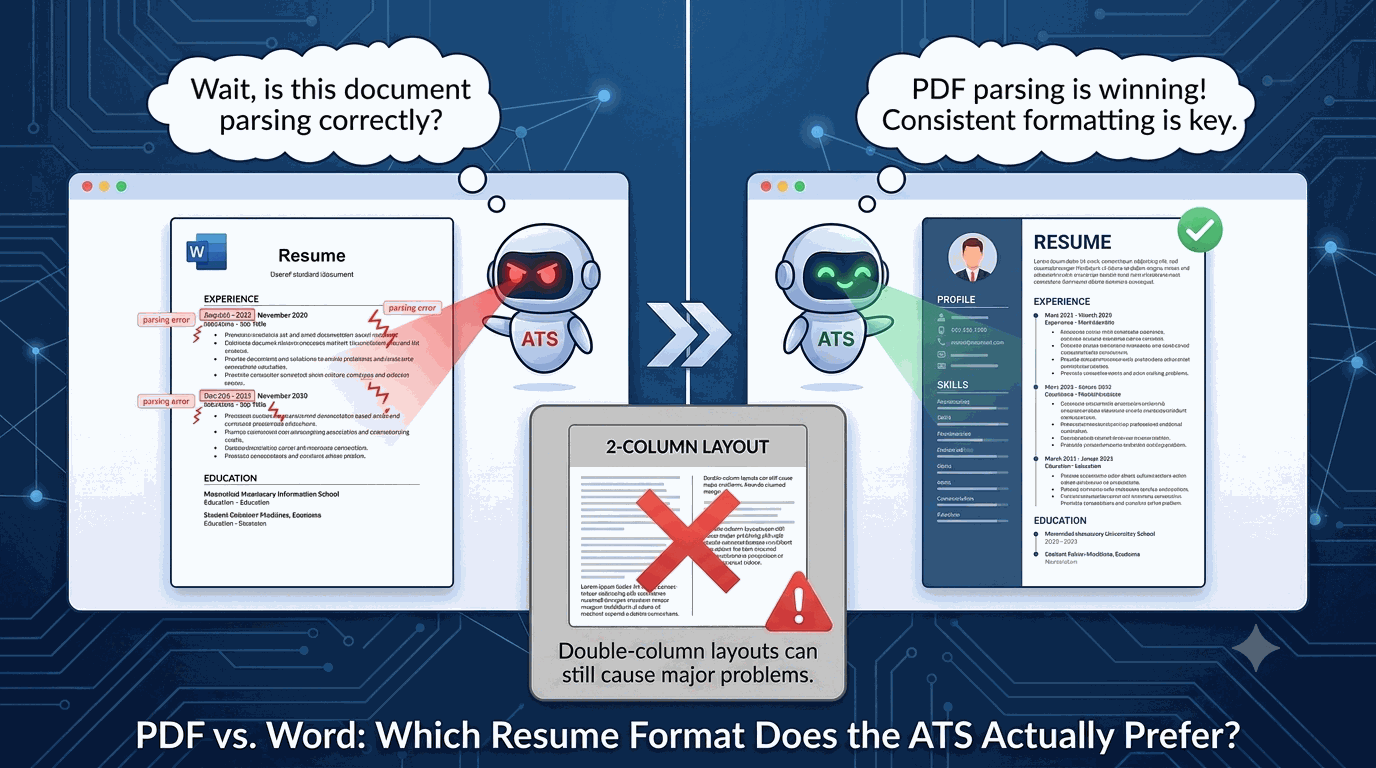
The honest answer is that it depends on who you ask and what data they’re working from. But if you’re asking what the data from actual job seekers applying to actual roles is showing right now in 2026—PDF is winning, and the margin is meaningful enough to matter.
Here is what is actually going on under the hood of modern Applicant Tracking Systems (ATS), why the double-column question is more complicated than most people realize, and how you can ensure your formatting isn’t holding you back.
Why This Question Is So Hard to Answer
The reason the PDF vs. Word debate has lasted this long is that there is no single “ATS.” There are dozens of them—Greenhouse, Workday, Lever, Ashby, and iCIMS, to name a few—each with its own parsing engine, its own quirks, and its own update history.
- Greenhouse handles files differently than Workday.
- Lever has its own unique layout behavior.
- Ashby parses text streamingly.
Each of these platforms updates its parsing logic regularly, which means advice that was accurate two years ago is completely outdated today.
This is also why a lot of the guidance you find online is confidently stated but poorly sourced. Someone had a bad experience uploading a PDF in 2019, wrote an angry LinkedIn post, it went viral, and now it’s treated as conventional wisdom.
The better question isn’t “what does the internet say?” but “what do the numbers say for people actually applying right now?”
What the 2026 Data Is Showing
When you track application submissions at scale—the format submitted, the role type, and whether it successfully converted into an interview—a clear pattern emerges. PDF submissions are correlating with higher interview rates than Word document submissions across almost all roles and industries.
At a time when employers are rating the entry-level job market as “fair” rather than “good” (as noted in NACE’s recent 2026 reports), competition is tighter than ever. Controlling your document variables is critical.
PDFs, when built correctly, are structurally rigid. What you see is what the ATS gets. The layout doesn’t shift, the fonts don’t substitute, and the spacing doesn’t collapse. A well-formatted PDF is a controlled document in a way that a .docx file simply isn’t.
Word documents render differently depending on the version of Word, the operating system (Mac vs. Windows), and the default settings of the specific machine opening them. When a Word document is uploaded to an ATS and the parsing engine opens it, minor rendering differences can create invisible parsing errors. A line break in the wrong place, a shifting table, or a header that bleeds into the body can jumble how your resume reads to the algorithm.
A PDF built on a solid, single-column template doesn’t have that problem. What you built is exactly what gets read.
The Catch: When Double-Column Layouts Backfire
Here is where it gets complicated, and where a lot of job seekers using PDFs are still getting burned.
Not all PDFs are created equal. A PDF with a double-column layout—where your skills are in a narrow left column and your work experience runs down a wider right column—introduces a parsing problem specific to how ATS systems extract text.
Most ATS parsers read left to right, top to bottom, in a single linear pass. They are not interpreting the visual design of your document the way a human eye does; they are simply pulling raw streams of text.
When a parser encounters a two-column document, it often reads straight across both columns at the same horizontal position before moving down. This stitches together content from the left and right columns into a single jumbled line.
The output on the recruiter’s screen ends up looking like this:
Managed enterprise sales pipeline Generated $2.4M in ARR across 12 accounts Python SQL Tableau PowerBI for a team of 8 reps covering the Southeast region.
None of those words are wrong, but the context is completely destroyed. Your technical skills got woven into the middle of your experience bullet. The algorithm can’t tell what belongs where, and a jumbled parse is almost as bad as no parse at all because the system can’t reliably match your keywords to the right sections.
This is why gorgeous, double-column PDF resumes often perform terribly in the ATS. The aesthetic is irrelevant to the parser; the reading order is everything.
When Double-Columns are Safe vs. Unsafe
A blanket “never use two columns” rule throws out some legitimate formatting choices. Here is the breakdown:
❌ Where double-column layouts break:
- Side-by-side main content: Putting your experience bullets in one column and your skills/tools in another.
- Two-column headers: Running your professional summary or objective alongside your contact information.
- Asymmetric templates: Placing section headers in a narrow left column and the descriptions in a wide right column. This visually clean template reads as absolute chaos to a text extractor.
Where two columns can survive:
- An isolated skills block: A skills section formatted as a clean, two-column bulleted list, provided it is completely isolated from the single-column structure of your work history.
- Linear contact headers: Contact information presented in a single centered row at the top, even if it uses tab spacing to distribute across the page.
The Golden Rule: Anything the ATS needs to read with deep context—your experience bullets, job titles, dates, and summaries—must live in a clean, single-column layout.
How to Test Your Resume for ATS Compatibility
Instead of guessing whether your layout is parsing correctly, you can test it directly using GigHQ’s intelligence suite.
- Scan Your File with ResumeRank: GigHQ’s resume parser scores your resume against any target job description. It will instantly show you your match score, identify missing keywords, and reveal if any of your content is parsing in a jumbled order.
- Track with the GigHQ Chrome Extension: While browsing jobs on LinkedIn or Indeed, you can run a real-time “Candidate Match Score” to see how your PDF parses against live job descriptions. Check out the Chrome Extension YouTube Demo to see it in action.
- Draft Tailored Materials with CoverGenius: Once your resume’s single-column PDF structure is locked down, use CoverGenius to draft highly tailored, ATS-friendly cover letters that match the keywords of the role.
The Practical Recommendation
If you are currently using a single-column Word document and getting interviews, you don’t need to panic. But if you are choosing between the two formats, the evidence points toward PDF—provided it is built on a reliable, single-column template.
Your priority checklist:
- Single-Column Structure: Keep all work experience, bullet points, and dates in a linear, top-to-bottom layout. This is non-negotiable.
- PDF as Your Default: Use a clean PDF format to lock your styling and ensure it renders exactly the same way on a recruiter’s screen as it does on yours.
- Word as a Backup: Keep a
.docxcopy on hand only if a company’s application portal explicitly requests it. - Never Freehand Your Formatting: Build your resume on an established, ATS-tested template rather than designing one from scratch in a basic editor.
If you are ready to ditch the administrative headaches of job hunting and move past messy spreadsheets, check out our guide: How to Track Job Applications (Without a Spreadsheet!).
The Bottom Line
The format of your resume is one of the few variables in your job search you can control completely. Given how much work goes into tailoring your experience, quantifying your achievements, and networking, it would be a shame to let a bad layout hold you back.
Get the structure right, let ResumeRank check your work, and give your applications a real fighting chance.
Our Platform Tools:

ResumeRank
Scan your resume, get a score, fix what matters.

CoverGenius
Generate personalized, AI-powered cover letters in seconds.

OutreachAgent
Craft perfect networking and AI-powered follow-up emails with ease.

CareerCompass
Instantly generate a personal marketing plan from your resume to define your brand and attract the right opportunities.

Smart Prep
Simulates a real interview based on your resume and the job description, giving you real-time feedback to build your confidence.

Profile Spark
Optimize your LinkedIn profile to attract recruiters and opportunities.