There is a precise moment in almost every job search where anxiety silently transforms into urgency, and urgency tips over into something that looks a lot like desperation—even when you are trying your hardest not to let it show.
You turn on the green “Open to Work” banner on your LinkedIn profile because you want recruiters to find you. You start applying to roles that aren’t quite right because “something is better than nothing.” You broaden your search criteria—any industry, any company size, any title in the general vicinity of your past work. You hit “Quick Apply” on fifteen listings in an afternoon because volume feels like momentum.
From the inside, none of this feels like desperation. It feels like hustle. It feels like the responsible thing to do when the mortgage is real, your savings timeline is shrinking, and your inbox is quiet.
But from the outside—and more importantly, from the perspective of the algorithms and the hiring managers processing your applications—it reads as something very different. The cost of that signal, invisible in the moment you send it, compounds quietly across your entire job search in ways that most people never trace back to the source.
At GigHQ, we look at the job search through the lens of data, not hope. Let’s break down exactly what “desperation mode” does to your job search at an algorithmic level, what groundbreaking macroeconomic research says about the timing of job applications, and how you can reclaim your leverage.
1. What “Open to Work” Actually Communicates
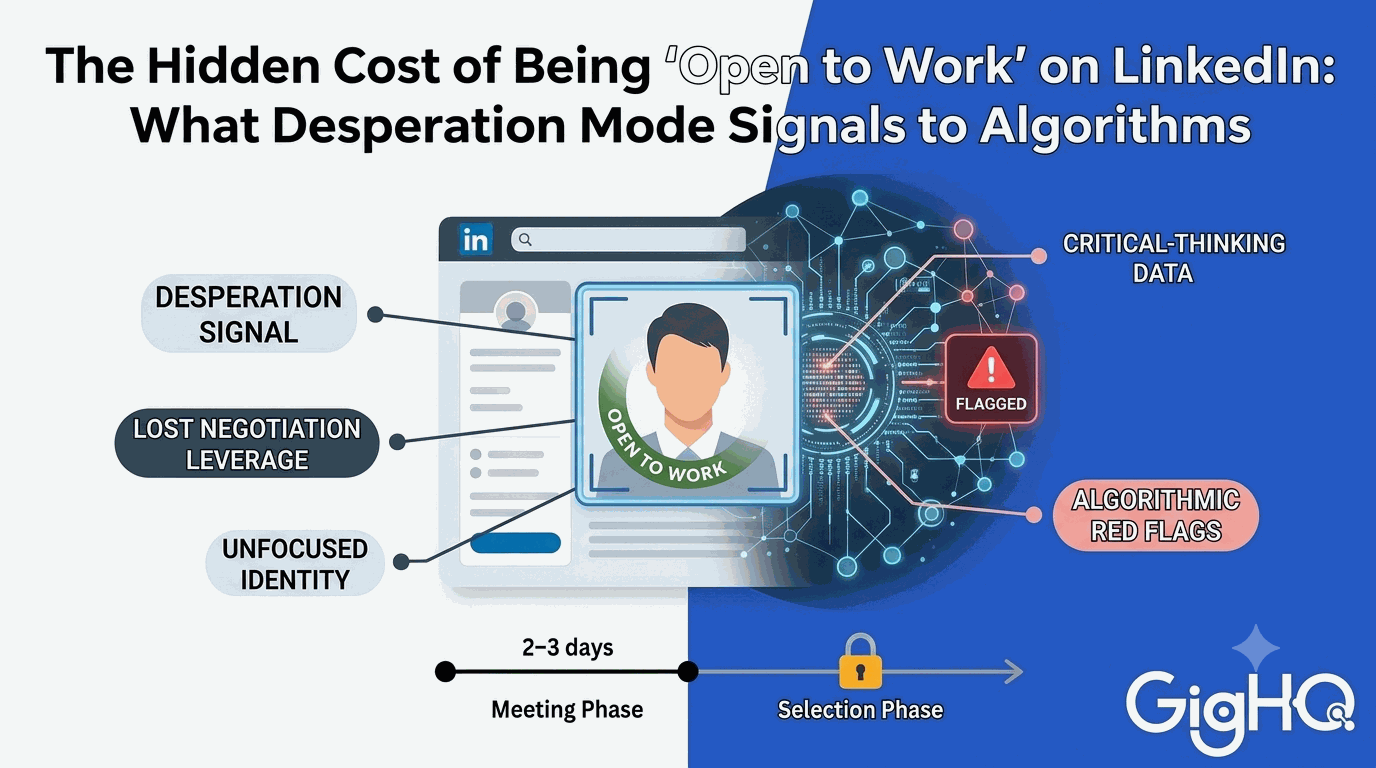
The green “Open to Work” frame on your LinkedIn profile photo is, on its face, a neutral piece of information: this person is looking for a new role. LinkedIn introduced it to make job seekers more discoverable, and in a narrow sense, it works—recruiters can filter for candidates who have it enabled.
But information is never just information. It always carries context, and context shapes interpretation.
Here is the context that the “Open to Work” banner carries for the people most likely to act on it:
- Top-Tier Employers Don’t Troll for the Banner: Recruiters at high-growth companies with highly desirable roles are rarely running generic searches for candidates broadcasting general availability. They run highly targeted searches, tap trusted networks, and source referrals.
- You Attract the Wrong Crowd: The recruiters most responsive to the “Open to Work” signal are often working the high-turnover, commodity end of the market—staffing agencies looking to fill seats quickly, or headhunters dealing with hard-to-fill, low-retention roles.
- You Lose Your Negotiating Leverage: “Open to Work” doesn’t just say I am looking. It says I am looking right now, actively, and I want you to know it. Before you’ve even had a first screening call, you have shifted the power dynamic. You’ve signaled that you need something, which is a challenging negotiating position to start from.
2. What Desperation Mode Does to Your ATS Profile
When a job search drags on, many candidates enter what we call Desperation Mode. It has a highly recognizable set of behavioral signatures, and almost all of them are visible to the Applicant Tracking Systems (ATS) like Greenhouse, Lever, and Workday that process your submissions.
Unfocused Professional Identity
When you are anxious, the temptation is to expand your search. You apply to Product Manager roles, Operations Manager roles, Program Manager roles, and Strategy roles. The logic feels sound: more applications mean more chances.
But to an ATS, this looks like noise. Shared algorithms across tracking platforms build a profile of your candidate journey. If a system sees you applying to five vastly different job families, it doesn’t see a versatile candidate—it sees an unfocused professional identity.
Volume Over Targeting
Desperation prioritizes quantity over quality. Fifteen “Quick Applies” in an afternoon feels incredibly productive. In reality, it yields fifteen low-quality, untailored submissions that are highly unlikely to convert. Every quick, untailored application that results in an automatic rejection is a negative data point attached to your profile in that company’s database.
Overqualification and Underqualification Signals
When the floor for “worth applying to” drops, you start submitting to roles where you only meet $40\%$ of the requirements. Conversely, you think, “I’ll take a junior role just to get my foot in the door.”
Both moves trigger algorithmic red flags. Hiring platforms are highly sensitive to overqualification (assuming you will quit the moment a better offer arrives) and underqualification. A pattern of applying to mismatched roles signals to the system that you are not self-selecting effectively.
3. The Science of the “Meeting Phase”: Groundbreaking Macroeconomic Data
To understand why panic-applying fails so spectacularly, we have to look at how employers actually hire.
In a groundbreaking April 2024 NBER working paper titled “Application Flows,” economists Steven J. Davis and Brenda Samaniego de la Parra analyzed a dataset of over 125 million job applications. Their findings shatter the traditional assumptions of sequential job searching:
- Posting Durations are Incredibly Short: The median duration a single-position job posting remains active is just 7 days. The mean is only 9.4 days.
- The “Meeting Phase” vs. the “Selection Phase”: Employers do not search sequentially (evaluating candidates one by one as they arrive and hiring the first one who passes a threshold). Instead, they run non-sequential searches. They open a brief 2-to-3-day “meeting window” to gather a pool of applicants, shut the posting down, and then spend weeks in the “selection phase” (screening, interviewing, and negotiating).
- The 48-Hour Rush: Because job postings disappear so quickly, job seekers display a striking propensity to target fresh listings. In fact, 45% of all applications flow to vacancies posted in the past 48 hours, and 60% go to those posted in the past 96 hours.
Day 0: Job Posted
First 48 Hours: 45% of all applications submitted
Day 7: Median posting is taken offline (Meeting Phase Ends)
Weeks 2-6: Deep Screening, Interviews, and Offers (Selection Phase)
The takeaway is clear: If you are in desperation mode—spending hours sending untailored resumes to weeks-old postings—you are trying to enter a door that has already been locked. The “meeting phase” has ended, and the employer has already transitioned to the “selection phase.”
4. The “Ghost Job” and Spam Epidemic
The market’s response to “Easy Apply” features has created a toxic cycle. Job seekers use automated bots to mass-apply, drowning recruiters in thousands of low-signal applications.
To cope, employers leave “Ghost Jobs” active—listings they have no immediate intention of filling, used merely to build a passive resume pipeline or project the illusion of company growth. According to recent talent acquisition data, a staggering 73% of job postings on major boards are estimated to be ghost jobs.
When you panic-apply, you are highly likely to waste your precious energy on fake opportunities that LinkedIn Premium can’t help you detect.
5. What to Do Instead: Reclaim Your Leverage with GigHQ
The alternative to desperation mode is not passivity. It is targeted intensity—a highly disciplined, focused approach that makes you look selective from the outside, even when your internal timeline feels urgent.
Here is how you can use the GigHQ.ai platform to run a high-signal, data-driven job search:
Step 1: Ditch the Manual Spreadsheets
Tracking your job search shouldn’t be a second full-time job. Instead of manually copying and pasting data into a brittle Excel sheet, apply using your unique, free @gighq.ai email address. GigHQ automatically tracks your applications, correspondence, and interview timeline in a clean, unified dashboard.
- Watch how it works: How to Track Job Applications (Without a Spreadsheet!)
Step 2: Stop Browsing Blind
Don’t guess if a job is real or how fresh it is. Install the GigHQ Chrome Extension to see instant job and company insights directly on job boards like LinkedIn, Indeed, and Handshake.
- See the extension in action: Chrome Extension Demo
- Detect “Ghost Job” indicators, company response rates, and real-time application trends so you can target roles in that crucial, high-conversion 48-hour window.
Step 3: Grade Your Fit with ResumeRank
Before you submit an application, use ResumeRank to score your resume against the specific job description. This ensures you only apply to roles where you are a genuine match, saving your ATS profile from the “desperation mode” keyword mismatch penalty.
Step 4: Tailor Your Outreach with CoverGenius & OutreachAgent
Instead of mass-spamming generic resumes, use CoverGenius to generate tailored, highly relevant cover letters in seconds. Then, leverage OutreachAgent to craft personalized networking and follow-up emails to recruiters, ensuring your application enters the “selection phase” with human advocacy behind it.
Step 5: Dominate the Selection Phase with SmartPrep
Once your high-signal approach lands you an interview, use SmartPrep to run AI-powered mock interviews tailored to your resume and the target job description. This ensures you are fully prepared to navigate the long, rigorous selection process.
Step 6: Bring Your Search into Your AI Workflow
If you use Claude or ChatGPT for your daily work, you can stop copy-pasting your job search data back and forth. Integrate GigHQ directly into your AI clients to query your applications, analyze skills gaps, and draft follow-up templates dynamically.
Watch the integrations:
- Stop Copy-Pasting Your Job Search Data Into ChatGPT! (MCP Integration)
- Inside the GigHQ Ecosystem: AI Career Copilot & MCP Advantage
- How to Connect Claude.ai to GigHQ (MCP Setup Guide)
The Bottom Line
The “Open to Work” banner is a small visual setting, but the behavioral patterns of a desperation-driven search are a massive structural liability. Together, they send a signal to both algorithms and humans that works directly against you.
The fix is not to pretend you aren’t looking. The fix is to look the way someone looks when they have options: specifically, selectively, and with a clear sense of exactly what they are after.
The search that is run with focus and discipline tends to produce the options that make focus and discipline easy to maintain. Stop playing the job board lottery.
Ready to transform your job hunt? Get started with GigHQ.ai today—it’s free forever.
Our Platform Tools:

ResumeRank
Scan your resume, get a score, fix what matters.

CoverGenius
Generate personalized, AI-powered cover letters in seconds.

OutreachAgent
Craft perfect networking and AI-powered follow-up emails with ease.

CareerCompass
Instantly generate a personal marketing plan from your resume to define your brand and attract the right opportunities.

Smart Prep
Simulates a real interview based on your resume and the job description, giving you real-time feedback to build your confidence.

Profile Spark
Optimize your LinkedIn profile to attract recruiters and opportunities.